
When ClipWall stops playing
What a looping wallpaper costs your battery, the three moments ClipWall stops on its own, and the one setting that changes it.
It is a fair thing to worry about. A video that never stops is a video that never stops costing you, and a laptop that runs an hour shorter because the desktop looks nice is a bad trade.
ClipWall’s answer is simple enough to state in one line: it does not play to nobody.
The three moments it stops
A window covers the desktop. The moment your wallpaper is completely hidden behind a browser, an editor, or anything else, playback stops. Move that window and it picks up again. Most of a working day is spent with the desktop covered, which is exactly when a wallpaper is least worth paying for.
Your Mac goes to sleep. Nothing plays to a dark screen.
The screen locks. Same reasoning. A lock screen has its own picture, and your clip is not on it.
None of these need setting up and none of them need thinking about. They are the default behaviour.
What that is worth
While the wallpaper is visible and playing, ClipWall uses a small slice of one processor core. While it is hidden, that drops to nothing at all, because there is no decoding happening rather than decoding happening quietly.
The exact numbers depend on your Mac and on the clip: a short, gently moving 1080p loop is much cheaper than a busy 4K one. The behaviour is what matters. A wallpaper you cannot see costs you nothing.
The one setting that changes it
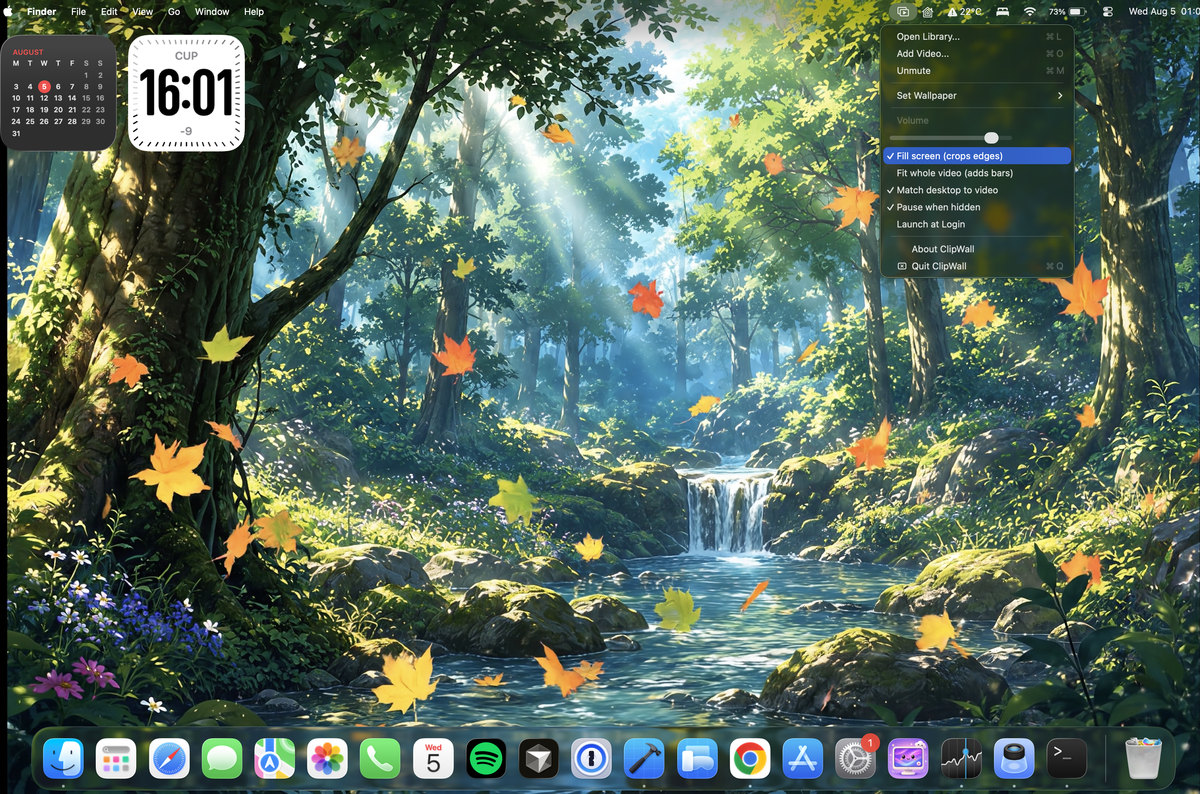
Pause when hidden is in the menu bar menu and it is on by default. It is the switch behind everything above.
There is one good reason to turn it off. If you work across several Spaces and flick between them often, a clip that stops and restarts every time you switch can feel less settled than one that simply keeps running. Turn Pause when hidden off and ClipWall keeps playing whether the desktop is in front of you or not. You are choosing continuity over battery, deliberately, which is the point of it being a switch rather than a decision made for you.
On a Mac that is plugged in most of the time, that trade costs you very little.
What it never does in the background
ClipWall has no network access at all. Not restricted access, none: the app ships without the entitlement that would let it reach the internet, so there is nothing to download in the background, nothing to sync, and no account to be signed into. Everything it plays is a file already on your Mac that you picked yourself.
It also takes up no space in the Dock while it runs, and it opens no window unless you ask for one. The menu bar icon is the whole of its footprint.
If it stops when you did not expect it to
A clip that goes quiet on its own has usually lost its file rather than hit a bug. The original was moved, renamed, or lives on an external drive that is no longer plugged in. ClipWall never moves or deletes your videos, so the file is still wherever you put it: reconnect the drive, or add it again from its new home.
If playback stops while the desktop is plainly visible, check that the clip is still in the library and that Pause when hidden is not doing something you have forgotten about on a second display.